Tag: Usability

  • Speaker Notes: How To Be Invisible

    Speaker Notes: How To Be Invisible

    Speaker notes from a talk I gave earlier this year at Try!Swift, and 360iDev.

    There was an article I read last September that profoundly affected my thinking. It was by Sarah Tavel, and is called Times have changed — going after dollars vs minutes. She breaks products down into minutes – which I think of as attention as a metric, and dollars – which are things people pay for, and compares two periods, noting that the earlier one (2008-2012) had mostly minutes raising Series A funding, and in the later one (2012-2015) it was a balance between minutes and dollars.

    She writes from a VC perspective, but from an engineer, from a design perspective, these things are also entirely different problems. It reminded me of a conversation I had with a friend a long time ago – she was contemplating a job at Zynga (remember Zynga? I told you it was a long time ago) and our conversation was around how we would feel, whether we could actually do a job… where what we were building was a form of digital crack.

    Addictive games. Digital crack. But what this article did was expand my view of what digital crack is. How many jobs in tech involve building it. Not just games, which have never appealed to me, but any kind of social media. A long time ago I worked on G+ and perhaps the problem there was that instead of digital crack it was more like a digital multivitamin.

    Digital crack is about the thrill of unpredictable reward. It’s creating a place where hours pass – with user attention spans on mobile being short we’ve cut it to minutes pass. It’s about pulling people back in with notifications. It’s about a careful balance between sucking people in, but not being too annoying, because we’ll drive them away.

    Digital crack is a pejorative phrase, but digital crack is not inherently bad. I love Twitter as much as the next person, and my current digital crack is actually Duolingo. I spent a lot of time this year in South America and I’m working on hablando más español.

    And I realised I don’t want to build digital crack. And I’ve always known this, if I look at the things I’ve worked on – I built most of the first Google presentations experience on iOS, I ran a team that built a location based B2B app. Most recently I was working at Ride where we built something to help people car pool. My passion project for a long time has been an image processing app – note processing not sharing. I look at my career choices, and that brief lapse in judgement when it comes to G+ aside, I have chosen to build things that help humans achieve things. Tools rather than experiences.

    But I think it’s hard because in this industry we laud the digital crack. Attention is the foundation of the business model. This analysis aside, we have the impression that it’s what the VCs are funding. It’s what we’re talking about. Like right now, when everyone has been talking about Pokemon Go. Yes, that second list was balanced, but I’d heard of more of the “minutes” apps.

    But if we’re not building digital crack, if our metric is not minutes spent, if it’s actual human effectiveness, what matters? What are we even doing?

    Make Complex Processes Simple

    Show and Hide

    How to be Invisible.006

    This is my passion project, it’s called Show & Hide. So like I said, it’s an image processing app but what does that mean vs something like Instagram, which is an app that filters images and a platform for sharing them? A process means that we analyse the image and change it based on that analysis. So what Show & Hide does, is it analyses the dominant color of an image and then makes two partially coloured images based on that. The first one showing the dominant color, the second hiding it. The idea is, that it creates those postcard images – you know like the ones of London, the bus is red and the background is black and white, but you don’t need, you know, actual artistic talent.

    Anyway, an image is just an array of colours, which we might think of as a grid of numbers. And a filter is just another grid of numbers, so to apply a filter all we need is a little Matrix multiplication. Not only is this a solved problem, it’s one that is done for us by the platform.

    But processing an image is not a solved problem, and it’s vastly different based on what we are processing that image for. So my first functional go at this on iOS scaled down the image a lot and took ~10 seconds to run. But the version that shipped, you move the slider and the image changes in real time, and on iOS at least, that’s pretty much the full-sized image.

    On a practical level, what did I do? I optimised the hell out of it and wrote it all in C.

    On a user-experience level, what did I do? I made the distinction between a process and a filter invisible. It’s a process, but it feels like a filter, which is what users are used to – and what they expect.

    Location

    When I think about location, I think about Harry Potter and the Marauder’s Map map. Harry is invisible, but he still shows up on the map. This is often when he is being most effective. He – or pretty often Hermione (we all know she does most of the work) – are doing stuff that they can only do when they are invisible.

    It’s often clear as developers how location will help us, but if we’re not careful we are too visible. Either by draining the battery, or just being annoying.

    I worked on this B2B app called Coordinate. It was an app for tracking your mobile workforce, like they would have jobs and you could route them to nearby jobs.

    We needed to do continual background location updates with varying levels of accuracy. For high location accuracy we needed 8 hours and like, ~15m 5minute data.

    We came in to do this on iOS when it had already been done on Android, and so people didn’t really understand how different it was. But the iOS location API wasn’t designed to work that way. When we just turned it on with that level of accuracy, the battery burnt down in an hour, especially if you were say, riding a motorbike on the highway.

    We weren’t exactly invisible there.

    So we figured out thresholds for turning the GPS on and off, tried to be smart about when we would send a location and when we wouldn’t, cached locations, and eventually when caching wasn’t enough – if say, you were on an island with poor cell service, taking pictures of adorable koalas – implemented offline.

    Eventually we got to ~12 hours of battery life on high, and for low accuracy our battery usage was barely noticeable. We were actually doing better than the Android app.

    We had become invisible.

    Glowforge

    How to be Invisible.008

    This is my friend Dan. He’s taking selfies with an owl in Tokyo.

    Dan made this game called Robot Turtles with his kids, it was the most backed boardgame on Kickstarter. As part of doing this, he acquired a 10,000 USD laser CNC machine that had to be delivered on a forklift truck.

    How to be Invisible.009Here’s the CNC machine, with some children for scale. And on the right are the custom pieces, and a key. Pretty cool, right?

    Anyway, Dan’s now CEO of this startup called Glowforge. They make a desktop laser cutter – they call it a 3D laser printer. It’s pretty amazing. Pre-sale right now and shipping later this year. Full disclosure: I’m an advisor, and one of the many benefits of that is that when I go to Seattle they let me play with it.

    How to be Invisible.010

    Here’s some stuff I made on it. It’s really cool, you see the bed, and you move your design over it, and then you press go. So first – because I’m such a programmer – I made a hello world. I printed out a logo for my then-boss. More ambitiously, these are the pieces for a Technically Speaking keychain, and the necklace is the Show & Hide logo, engraved and cut away.

    How to be Invisible.011

    I also made this thing. So this is a picture of my shadow, which I took in Venice. Then Tony and I turned it into a cut, and printed it on clear acrylic. Now when I hold it up to the light, and shine a light on it, I can project my shadow all over again.

    I’m not really a physically creative person, so this whole experience was pretty revelatory for me. I was so intimidated at first, but then I discovered that it’s super easy! And super fun!

    So you might think the achievement here is getting it on a desktop – no more need for a forklift truck on delivery. And that’s true.

    Or maybe that it’s now less than half as expensive. That’s pretty cool too.

    But from a software – user experience – perspective – here’s something I think is really, really awesome. Because that old laser printer? Not only is it large, and expensive, and terrifying, to make it cut in the right place requires the user to position the material very exactly.

    But Glowforge users won’t need to do that. Probably many of them will never know that’s how it used to be. The challenges of positioning have disappeared. It’s all done using image recognition.

    Show Decisions not Data

    What Should I Wear?

    How to be Invisible.013

    Weather is the canonical example of this, because how many of us have ever even seen a meteorological report? Well now we have. But with weather we care about the the conclusion – what are we going to wear? What is a good day for that hike?

    How to be Invisible.014

    And so we look at something like this which gives us the conclusion, not the data it’s based on.

    When Should I Leave?

    Another example is traffic. I have a smart watch, and it tells me when I need to leave. It’s not super accurate, and often it tells me when I’m already on my way, but it’s getting there.

    How to be Invisible.015

    The interim step to getting there was this traffic view – notice the subtle color coding on the map about the severity of the traffic. A really subtle visualization of a lot of data.

    What Should I Do?

    The first two of these are kinda boring, and predictable – stuff that we’ve all known was coming for a while. But what should I do is an interesting one. This is the problem with FourSquare. They are evaluated like they are building Digital Crack because it’s considered to be a social network, but they are actually trying to drive behavior – dollars in the real world. If I use FourSquare, and I take 5 friends with me, that’s not tracked on the app but it’s a change of behavior way beyond the metrics we see in usage. I found my favourite tea place in Medellin on Foursquare, and now I go there several times a week. That’s a significant behavior change.

    FourSquare tries to help me make decisions. It tells me where people go after the art gallery. It tells me where people go who like the things I like. It’s the app that I use that comes closest to making decisions for me. My usage doesn’t demonstrate addiction – it’s not digital crack – it does drives dollars in the real world.

    Eliminate Compromises

    The UI has always been a compromise. Programmers thought the terminal was fine. Humans wanted other humans.  The UI was this thing in the middle. It was a hack that pleased no-one because humans found it so foreign and programmers have generally despised building it. So now we see the rise of Slack as a platform, the increasing popularity of chat based interaction – the idea that no UI is the new UI.

    Go Where People Are

    This is why I find bots and integration interesting, because they come to where you are and don’t ask you to add another (digital) place that you “visit”. The interaction comes to you. the behavior change seems minimal.

    I think this relates to bots being so effective at causing significant behavior change. Who uses Slack? Who has the bot that corrects you when you say “guys”? We had that at Ride, and I saw it changing people’s behavior. They don’t have to seek out this awareness of language, and how it matters, it comes to them. Now most of us have left, we have a new Slack, and we haven’t set up the bot – but I don’t see anyone using “guys”.

    Speak Human

    This is about meeting the user where they are. And when we think about language here we think about error messages. The worst culprit of inflicting tech speak on humans, we give people this terrifying experience – something has gone wrong! Did they do something to cause it? And we communicate this with an incomprehensible message. More subtly we fall down on this when we focus on what the user does, rather than what they achieve. Kathy Sierra talks about this. She talks about making users badass and isn’t that… well that’s what I want to be doing.

    But really what it means is you don’t ask them to learn anything, because you are communicating with them in a way that they already know. This is not just human language, but conceptual language – it’s dragging an image over your material and pressing “print”, rather than trying to figure out an opaque calibration system.

    Listen

    Human communication is only around 7% vocal content. Some of it is vocal elements, but 55% is non-verbal. Body language, tone, these are all clues to our real meaning.

    Digitally we have the interaction, but we also, especially on mobile, have things that we might know, like location, calendar, social media. These are all signals of what is going on with a user, and when we can use them it’s transformative of the UX. When a product appears to learn and get better based on this data, then it requires less and less interaction because the conclusions from that data have got better and better.

    Here’s the thing…

    User experience has been the bridge we built between the way that machines operate and how humans do. It is how we have allowed humans to create and manipulate data digitally.

    But really it’s been a hack. This is why movies had talking, humanoid, robots. Because that was the dream – a computer wasn’t a computer, it was a cool sidekick with a super-power – machine intelligence and computational power.

    We’re not there yet. Anything that begins to look like the dream has typically been so much of a disappointment that it just makes it seem that we are further away. But putting together this talk encouraged me that we are making progress on this – it’s just different, and so gradual, that until I took the time to think about it, I didn’t fully realize.

    Because the experiences we’ve seen in the movies have always been so ostentatious and shiney.

    But real progress, it turns out, sometimes looks like nothing at all.

  • Lasers and Practical Skills

    Lasers and Practical Skills

    This slideshow requires JavaScript.

    I first “met” Dan a year ago, right after GHC last year. He reached out to me because of the stuff I’d been writing about men and male allies. We became twitter friends, and so I got to read a preview of his book – which is great, because I’d realized that Dan was someone I could get a lot of useful information from, if I knew what to ask. And then he wrote it down and O’Reilly published it, which is much more efficient for everyone.

    Since early this year I’ve been working with Glowforge, I started by working with them on their hiring process and technical interviews and they asked me to be an advisor, which is really cool. My understanding of what “advisor” means is basically: I talk to Dan, and other Glowforge peeps, and try to be helpful. This is pretty easy since I love doing all of these things! It’s awesome to work with people this interesting, building something so cool, who are so mindful of building an inclusive company. I’ve never felt so appreciated and valued by people I work with.

    I missed the sensation that was Glowforge at NYC Makerfaire by about 24 hours, but decided that Seattle was basically on the way to Toronto from Texas. And then I stretched reality a little more to decide that Seattle was on the way from Texas to Medellin (Colombia). I have no regrets though, because I got to spend around 72 hours hanging in Seattle and as many of them as possible with Dan and at Glowforge.

    This wasn’t part of the advisor description Dan sent me, but I gave myself the extra task of being the #1 Cheerleader for Team Glowforge. So of course I bought one on pre-order day. Despite the fact that I have 1) no artistic talent, 2) no practical skills, and 3) nowhere to live.

    You may be curious as to where you ship your Glowforge if you’re homeless? I had it shipped to my parents place. My mom thought I was deranged until I showed her the catalog of things she could make and now she’s calling it “her” Glowforge.

    Anyway, I finally got to make things with Dan on Sunday! Which was so cool. We made little charms with the Show and Hide app icon on them, and I got to draw on acrylic and have it cut out. Because I have no artistic talent I did the standard programmer thing of making a hello world… but now with MOAR LASERS.

    A magical evening of lasering took me from 25% excitement 75% anxiety (owning a thing! A large thing! A laser! That makes yet MORE THINGS! – Things are very stressful when you live in a series of hotels and AirBnBs) to 75% excitement 25% anxiety and I really do need to find somewhere to live before they ship. If my mom gets hold of mine I will never be able to get it away from her.

    I know a lot of women in Seattle, so we put on an impromptu #LadiesAndLasers night which was awesome. People made cool things with acrylic (and Nikki made me a hedgehog, which is amazing), and we had tons of fun.

    All of this to say: I’ve never even been to a makerspace. I haven’t touched any kind of Practical Making Device since I did a GCSE involving woodworking. There’s an enormous mill (named, creatively, “Milly”) and the laser that Dan used to make 3D Robot Turtles pieces in the office, large terrifying machines, that require goggles and precautions and, or so I imagine, Practical Skills. But the team has managed to build something that isn’t terrifying, which is so cool! At a high level I’m excited about the democratization of technology. Personally though, something that I never thought would happen has: I’m excited to make physical things.

    The pre-order campaign ends Friday and you can get yours here with $100 off from my referral code.

    Or if you’re looking for a job and can/will live in Seattle, they’re hiring.

  • Unreasonable Expectations for my Calendar

    Unreasonable Expectations for my Calendar

    calendar
    Credit: dane_au / http://www.elfwood.com/~dane_au/Evil-Calendar-Kid.2654934.html

    At the moment I’m trying to work out where I’m going to be for the next two months. A trip to New York is fixed, but a trip to Europe is not. And then there’s the maybe on Utah… too many dependencies!

    I find scheduling things stressful – the CompSci in me wants to find the optimal solution, but in reality it’s tough to do better than a greedy algorithm.

    Some things are fixed – events, for example.

    Some things are flexible – like the gym.

    Some things have dependencies:

    • Location – schedule things in similar places together.
    • People – need to find a time that works for both people. And pick a location (who goes to who? Meet in the middle?)

    When scheduling stuff with other people, location based services could be helpful to determine a good place for both people. I.e. mostly person A checks in at places in the West, and person B in the East, but on Tuesday afternoons they both tend to be North – so how about coffee at 6? We can determine that A likes Tim Hortons, and B likes Timothy’s, but at a push Starbucks will work for both.

    Phones have GPS trackers, and I don’t want to call or text whilst driving. But what if my phone could ask me, “it seems you are moving at less than 5mph, would you like me to text <person I’m meeting> and say you are stuck in traffic and expect to be 5-10 minutes late?” and I could respond – “yes” or “no”. Going further, because with cellphones everyone always seems to be late, I want to ask the other person’s phone – based on their ETA and my ETA, do I have time to drop off my dry cleaning?

    What about flexible appointments like the gym? (I wrote about this here) Can my phone notice that I’m leaving the office at 1730 and say “you can either go to body pump at 6:30, or kickboxing at 7?” – and even “based on how much cardio you’ve done this week you should think about adding 30 mins on the x-trainer to your workout if you opt for body pump”.

    Flights – this is something that I think my calendar (Google calendar, of course) could really do a lot better with.

    • I should be able to put in a flight number and a day to and from and it should adjust the time difference in between. I find myself calculating time differences when I schedule events in the UK before I leave. That is bonkers!
    • Monitor delays. Recently I was sprinting through Toronto airport without shoes, or belt. My flight was delayed and I made it with 15 minutes to spare – this is the kind of thing I’d like my phone to tell me!
    • Picking up. I’d like my phone to tell me where to leave, based on calculations including – traffic, immigration, baggage collection, and – of course – flight delays.

    I realize that some people might find this creepy. But personally, I’d love it if some smart programmers could take this scheduling problem off my hands! I’m OK with a company I trust (i.e. not Facebook) having this kind of information about where I am and what I’m doing, if it makes my life easier.

  • Computers as Appliances

    Keep Calm and Put the Kettle On
    Credit: flickr / cole007

    Typically, the first thing I do when I get home is put the kettle on. In fact if I’m working from home I’ll get up around every 45 minutes to make more tea. Don Norman wrote about automating the process (so the coffee machine talks to the cupboard, fridge, dishwasher etc) and that would be awesome.

    However, as a creature of habit I want the kettle to know when my car pulls in to the garage because that’s about the time for it to be turned on (so tea is ready as soon as I get into the apartment). Unless I’m going to the gym right away, in which case I want a cool bottle of water ready to go (so my appliances should be talking to my calendar, as well as each other).

    Although, if I’m really stressed, I probably want Cherry Coke rather than tea. So perhaps my appliances could monitor my twitter feed and predict what I’ll want when I get home. And if I’m working from home, my kettle should be talking to my mug and predicting when I’ll want more tea.

    And, of course, if I develop a taste for white wine and that’s what I’m drinking as soon as I get in… my appliances could conclude that it’s time to call the doctor. Which presents the very interesting possibility – that in the future we won’t just be hiding our bad health habits from our friends and relatives, we’ll be choosing red wine over white – so we can hide it from our fridge.

  • Usability Impacts Decisions

    Petrol Station
    Credit: flickr / muehlinghaus

    My boyfriend and I both hate filling up the car with gas. We live 3 blocks from one gas station, and 4 from another. The first time we went to the one 3 blocks away, and it was a giant pain as we tried to work out how to use it. The credit card terminal on the machine doesn’t seem to get the fact that we don’t have an airmiles card, and so we have to pay inside. The second time we filled up there again, and again it was a pain.

    The next time we needed gas, we went to the one four blocks away. By contrast, it was easy. We were actually surprised by how painless it was. I doubt we’ll go to the one 3 blocks away ever again.

    As computers become more ubiquitous, and systems to replace human interaction more prevalent, there will be more and more situations like this – drive an extra block because that gas station is easier. Pay an extra couple of dollars on your grocery bill because that store has a better self-checkout system. (Not only is the self-checkout at the grocery store I go to a usability nightmare, but the staff are obnoxious and patronizing each time it doesn’t work – it’s infuriating).

    Bank websites often have terrible UI’s (I blogged about that ages ago) but as I ponder switching banks one issue is I don’t know what their online banking system will be like. It could be better, but what if it was worse…! Why aren’t they investing in usability, and then showing off how easy it is to bank online? That you can bank online is not enough information – of course you can bank online! It’s 2010!

    If software is a restuarant, the functionality of the application is the food. The usability is the service. Great service + great food = great restaurant. Great food + terrible service = good food, but I’m not sure I’d go back again. How many people walked out because the server was ignoring them and they couldn’t get a table? How many fantastic dishes went untried because the customer pondered what to order and the server rolled their eyes and yawned?

    I think in this analogy – filling up your car, banking, grocery shopping – these are fast food. There’s no big differentiation between the functionality of one, or it’s competitors. Usability is potentially the differentiator, so don’t encourage your customers to drive an extra block – that’s just stupid.

  • Programmers Will Change The World

    Don't wait for the world to change. Fix it.
    Credit: flickr / giarose

    On Tuesday, I went to an event at The Code Factory. Michelle Gauthier spoke for CapCHI on “User-Centered Design: A Cultural Challenge” (full details).

    I found it fascinating. I’ve been thinking about programming as a force for good a lot lately so it was great to hear an example about that.

    The talk was about her experience working for a non-profit, Digital Divide Data (DDD).

    Digital Divide Data is an international, non-profit IT company that builds bridges to opportunity in the global economy.

    Digital Divide Data was founded with the idea that the world’s poorest citizens can produce their own solutions to poverty in the new global economy if they have access to the knowledge, skills, and opportunities that power economic growth and lasting change around the world.

    DDD bridges the divide that separates young people from opportunity through our unique social enterprise model. We recruit disadvantaged youth in Cambodia and Laos and provide them with the education and training they need to work in a world-class digitization and IT company, serving clients around the world. Our staff acquire essential business management skills and attend school part-time with our support — breaking the cycle of poverty as they develop meaningful and rewarding careers.

    OK this is not just programmers changing the world, this is technology in general making it possible to build sustainable programs that will lift people out of poverty. The point is (to me, at least) – is that programmers are part of this. They’ve developed custom applications in order to process the huge amounts of data they go though – i.e. if you scan lots of documents in a series, you have to work out where each individual document begins and ends. The documents all need to be tagged as well, and have the title extracted.

    What Michelle was doing, was HCI analysis, determining why the processes were taking so much longer than expected and fixing the UI so it made more sense.

    It was interesting, because one of the things she said was “they have no mental model of a computer”. The concept of “save” in one application does not transfer to another. It’s really hard – probably impossible – for most of us to imagine not knowing how to use a computer. And, inevitably, when we try and write applications for people who don’t know how to use computers, we will make assumptions that will prove flawed.

    I think programmers already have changed the world though improving connectivity, automating repetitive tasks and writing software that has changed, fundamentally, the music industry.

    How will we change the world next? Tackling global warming though things like Smart Meters. Creating websites like Kiva which promote sustainable development through micro-loans. And I think we’ll write more pieces of software that help with outsourcing, education, and medical care in developing countries.

    Programmers needed to change the world. I’m totally on board, are you?

  • The Difference Between People-Speak and Programmer-Speak

    A New CAPTCHA Approach
    Credit: xkcd

    After I gave my presentation the other week, someone asked a question. It was:

    So, basically what you’re doing is data-mining?

    And I said, no, well yes, but that’s not how I think about it. I see it as creating something that will help people understand their use of Twitter. The fact that I achieve this by data mining is by-the-by.

    Maybe when we speak to other programmers it’s OK to say something like, “I’m data-mining social graphs in Twitter and visualizing them” but when we speak to our users, that may not mean very much to them. What’s more, I don’t think I would have come up the idea to do that if I’d gone to Twitter with the intention of data-mining. This didn’t come from me as a programmer with an interest in data-mining, or an interest in visualization (as an aside, I took a course in visualization at Edinburgh and hated it. Mostly because we were coding in Tcl). It came from me as a Twitter user, wanting a better way to measure engagement than followers/following.

    Yesterday, I wrote a little bit about the journey that brought me to Ottawa. I think I’ve finally realized what I’m passionate about. It’s people. It’s users. This is why I’m so fascinated about what I’m working on right now – what’s more people than social networking? It’s also why I’m so interested in Usability. I’ve read every article on Don Norman’s website, I find usability so interesting, so important.

    I’m passionate about giving users what they want – that’s usability, better ways to display data, etc. That’s creating the things they say they want.

    Even more so, though, I’m passionate about giving user what they want, that they don’t realize they want yet. In small ways, that’s telling people who are emailing spreadsheets about Google Docs, or explaining to someone frustrated by their web designer about the simplicity and ease of use of WordPress. In bigger ways, it’s been taking a mess of spreadsheets and turning it into a database that can answer questions that users hadn’t even thought to ask. It’s been creating something that’s can make you really aware of your conversational network, and encourage you to talk to new people (the most rewarding feedback I got was from someone who told me they were now making an effort to speak to more people after seeing their graph). I hope these things are just the beginning.

    So, what do I want to be when I grow up? I want to be a programmer who speaks fluent human. How about you?

  • Google Wave

    Google Wave

    I was super excited this morning when I got an invite to Google Wave. I’ve read about it, but whilst there’s been a lot of hype around it no-one seems to describe it such that I’ve really got it. Note – don’t expect me to be any different, I tried to explain to my boyfriend why I was so excited just a moment ago and he doesn’t seem to have any idea what I’m talking about.

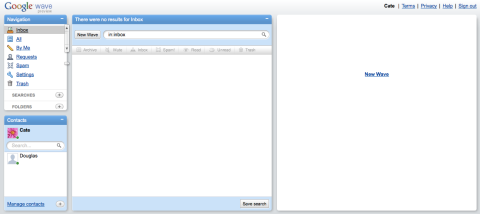
    Anyway, I’m an early adopter. I was on i’m in like with you back when it was hot and invitation only (now it’s more of a games site, before it was about flirting). So I’ve been bugging my friend who works at Google since I heard about Wave, and after he got in yesterday he very kindly sent me an invitation. I logged on, expecting to see something that would blow my mind… but it actually looks quite plain. See below:

    Google Wave: Empty

    Abstractly I think I thought that Wave would just replace my email. But I can’t send messages to people who aren’t on Wave, and the only contact I have is Dig. I also think Dig is getting bored of the incessant messaging (he, obviously, has a real job). Perhaps the most useful thing I can use it for at the moment is keeping track of the conversations in my head. I.e. I can have a Wave for a project, and write my little notes in it. However when my friends are on it, it’ll be amazing. At the moment we organize events through my Facebook status, but Wave is going to be a so much better solution. Ditto for WISE, sending out mass emails to 10+ people is a nightmare. People need to know what’s going on, but it clogs up your inbox. In a wave, you’ll just be able to skim the stuff that you need to be aware of and it’ll all be part of one conversation.

    Having conversations online is not always that “usable” of an experience; they can be hard to follow, too many threads or responses can overwhelm your inbox or ability to keep up with them. I really think that from what I’ve seen so far Wave will improve that. It’s like – email (longer messages) meets IM (instantaneous, see when they’re typing) meets Facebook (converse with multiple people, passively watch threads) meets real life (yes/no/maybe and map gadgets allow you to gauge interest, plan routes etc – more gadgets are coming. Also not only can you see that someone is typing – you can see what they’re typing as they’re typing it) and something more. The conversations we have online, and how we have them are different from the way we communicate in real life. I think Wave might bring is back to a more “natural” way of conversing.

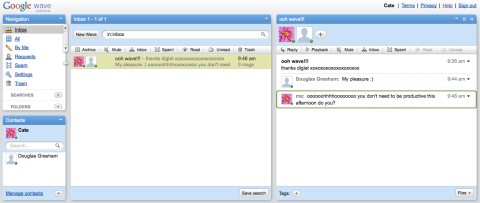
    One last really cool thing, you can “play back” your conversation, see the button next to reply? If you had a long, confusing conversation I can see that being really useful.

    More screenshots below:

    Google Wave: My First Wave

    Google Wave: Building a Conversation

    Google Wave: Continuing the Conversation

    Google Wave: Multiple Waves

    By the way – I can’t invite people (yet). Wish I could! Sorry to the people who’ve already asked for invitations and those who want to after reading this!

  • If You Can’t Find It, You Can’t Buy It

    Recently, I tried to pay my Rogers (Canada) bill online. Considering that you’re trying to give them money they really make it very difficult for you. Eventually I managed to set up an e-billing account for my banking. Linking this to Rogers for some reason necessitated downloading Firefox, as it does not support Safari (this makes me hopping mad; I have Flock on my mini, but don’t see the need to have two browsers on my Air). Anyway, having set all this up I discovered it’s only helpful from next month. I could scream. The problem of what to do this month is on-going.

    My modem (provided by Rogers), when properly secured, is also incompatible with my iTouch and Wii. I would call them, but I’ve already lost the will to live. Maybe tomorrow.

    In classes on Usability and E-commerce, we learn about this principle that if people can’t find something they can’t buy it. Usability is not just good practise for E-commerce – it’s essential to support the business model.

    However apparently it’s not essential for banks or bill payment. When they cut off your phone I doubt “but I couldn’t find my bill” will be considered a legitimate excuse. By this point, you’ve committed to the service and you can bank at a branch or an ATM, and pay your bill at the post office or by credit card (admittedly both these options are harder when the busses are on strike and your credit card is British). So it seems the usability of the site doesn’t matter so much.

    I really disagree. I’ve banked online using 2 British banks, 1 Canadian, and 1 US. They are, with the exception of HSBC UK, some of the worst company sites I’ve had the misfortune to come across. HSBC is no paragon, mind. They have a slightly bizarre security system where attempting to log-on twice in the same browser (so without “quitting” Safari – closing the window and then, later opening another one is inadequate) locks you out. Fair enough, perhaps, but to discover this you have to phone them – which is just a pain.

    And all this is so stupid. Encouraging your customers to pay their bills online and transfer money directly has got to be cheaper. Every time they have to call if costs the customer in time (and possibly money), the company, in money and also the intangible costs associated with annoying the hell out of your customer. We’re in the midst of a recession, if there was ever a time to try and reduce overhead it’s now. Ironically that might just be by shelling out the cash to conduct a thorough usability evaluation and redesign of these websites.

    Will it happen though? I’m sceptical. It’s hard to switch banks, and I would be with an alternative phone company, only they had the even bigger drawback – despite two attempts and numerous phone calls they never got as far as connecting my phone.