Tag: collaboration

  • Java Workshop in Wave

    Java Workshop in Wave

    Tonight, I ran my first workshop in Wave. It was nice to have a space to discuss things, and unlike in a chat client it’s easy to indicate what you’re replying to. What I did was create a slide deck and make it available the day before. Then on the day, I was available to trouble shoot. The slide deck was fairly comprehensive (see it here) so I encouraged people to work through it at their own pace, whilst I clarified and helped with issues that arose.

    Screenshot below shows mutiple threads of conversation happening simultaniously:

    Multiple Conversations
    Multiple Conversations

    It’s also really easy to drag and drop screenshots, so that can help me see where people are at, and what could be going wrong.

    Drag and Drop Screenshots
    Drag and Drop Screenshots

    Wave has nice indentations (kind of like we indent in Java!) that show a diversion:

    Indentation shows the flow of the conversation
    Indentation shows the flow of the conversation

    Finally, trying to schedule when everyone can make the next session can be difficult – but Widgets sure make it easier!

    Widgets help with scheduling
    Widgets help with scheduling

    So, all in all, wish Wave was faster but I think it was a success. Hopefully as people build up more knowledge they’ll discuss amongst themselves more. We will leave this wave going as people work their way through the rest of the slides (and I can help if necessary) and move to a new wave for the next session.

    I’ll keep you posted about when that will be – and will put the slides up here soon!

    Thanks to everyone who participated.

  • Collaborating on Google Wave

    Collaborating on Google Wave

    People are surprised by this, but there was a period that I checked my email just once a week a la Tim Ferris (Amazon). This was during my gap year when I was working and although it annoyed various people – my boss, a guy I worked with, some of my friends… I didn’t have a cellphone and had temporarily quit Facebook as well, so to be fair it was fairly difficult to get hold of me. However, I found myself to be much more productive. I missed email, but realized it’s a displacement activity. I check my email between tasks, before tasks, during tasks when I’m bored or distracted.

    Since I went back to university checking my email once a week has become impossible. Worse, though, even checking it once a day is infeasible because I’ve been using email as a collaboration tool, and it’s just not something it does well. I’ve tried to move to Google Docs, but that just means that I create a document, alert people I’m collaborating with by email, and wait. Sometimes I have to email a reminder to get them to look at it and then I’m checking my email – and my Google Docs account. Then maybe we discuss what we’re working on via email, even if the thing we’re working on is in Google Docs. In the worse case, the only thing saved is keeping the working document up to date.

    I got my Wave invite early on, and when I used my invitations my priority was to invite people I collaborate with, whether that’s for socializing, WISE, or academically (my supervisor got one, for example – we’re ditching email for Wave). The invites finally came through and I’ve now had my first “Wave collaboration experience” and it was awesome. I have to write an outline/blog post for a project we’re working on. I added our VP communications to the Wave and wrote it, then she came in and made some corrections. Underneath the section we were editing, we had a short conversation about what we were working on.

    Then, well, I cut and paste what we’d produced into an email because the other person who needs this isn’t yet on Wave. But still – significant improvement.

    Screenshot below:
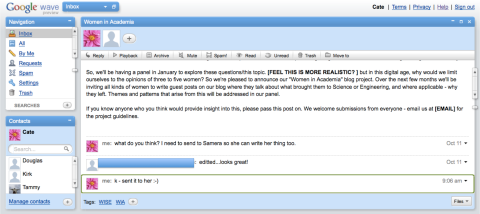
    Wave Collaboration Screenshot

    This is awesome; it’s what I hoped Wave would be good for and I’m finally starting to experience it. I don’t see it replacing email, but I hope that once more of my friends and the people who I work with are on Wave I can replace email with Wave to communicate with them, and email will be reserved for more formal things that I don’t want to be real-time, like university notifications, inquiries from students and job hunting – and I can cut back on checking it, perhaps to once a day? That would be nice!

    I am out of invites – please don’t ask me for one.

  • 15 Tools to make University Easier

    Subtitle: Things that Universities should tell you about, but often don’t.

    I’m in my 6th year at university now, and over the course of it I’ve assembled my suite of tools that maximize my productivity. When I meet people from outside of Computer Science, I’m always amazed that they haven’t heard of so many of these; so I’ve been inspired to create a list of things that I find really useful and hope you will too. If there’s anything you feel I’ve missed out – post it in the comments!

    Collaboration Tools

    Chances are, at university you’ll be doing some group work. You’ll spend ages trying to find a meeting time that works for everyone, someone won’t turn up, and at the end of the meeting you’ll wonder why you bothered having it in the first place. Unless – you use the internet to collaborate online, synchronously or asynchronously and minimize meetings whilst keeping everyone on the same page. Here are some things that can help.

    1. Online calendars. Google Calendar allows you to share with others – when you’re trying to coordinate your schedule for group projects or voluntary work you’ll be grateful for this.
    2. Google docs. Again, great for collaboration. Also, check out the widgets in the spreadsheets. You can create the awesome gapminder charts as seen in this great video from TED. It’s easier than making your own wiki (but that’s an option too).
    3. Google Wave. This will revolutionize communication and collaboration. It’s hard to get in right now but put out the word you’re interested and hopefully when someone you know gets an invite they’ll pass it along to you. If you need it now, LifeHacker has a list of alternatives here.

    Organizational Tools

    Poor organization is a big time sink. Staying on top of things will make your life much easier, promise! Here are some things that can help.

    1. Zotero is awesome for keeping track of your references and things you’ve read. Universities will often tell you to use Endnote or Ref Works because it’s “free”, but it’s not! When you graduate you’ll have to either find an alternative or loose everything. Zotero is free as in “free and open source”. And free as in cost (unless you end up needing extra storage).
    2. Todo Lists. There are loads of great, free tools out there to help you manage what you need to get done – Remember The Milk is a popular one. I find it helpful to set recurring daily tasks such as “Read a paper” so that I stay on top of what’s happening in my field.
    3. Open Office. Need an office suite? Open Office is a great substitute for MS Office and what’s more – it’s free (and open source). Whatever you’re using, though, learn what a cross-reference is and use it – once you know it, it’ll save you time and you won’t hand anything in with two “Figure 3″‘s.
    4. Keynote. If you’re giving presentations on a mac, don’t use Powerpoint! Keynote makes much nicer slides. I’ve spent too much time at university sitting through bad presentations loosing the will to live. Don’t do that to your peers. Take the time to read Presentation Zen, buy Keynote, and start impressing people. Given the low bar, it won’t even be that hard.

    It’s What You Know – Information Gathering

    I know, it can be hard just to keep up with the stuff we have to do for class etc. However, dedicating a little time every day to keeping on top of what’s going on will pay dividends in terms of being better informed, having more to talk about, and more ideas when put on the spot to think of one. I.e. instead of spending a week before your job interview reading all the career advice you can get your hands on, why not read a little bit a week? Rather than spending days thinking of a project for class, why not spend a little time keeping up with your field and keeping a list of ideas that you’d work on, given time?

    1. Blogs are an easy way to keep up with what people in your field are doing, and often people blog before they publish. What about other topics you’re interested in? Blogs can be a valuable resource for career advice or other fields that you’re interested in. Keep track of them on Google Reader or similar.
    2. Amazon. The Amazon recommendation system is phenomenal; it will recommend good books for you on the basis of what you’ve read (and will say what it’s basing it on). Read around your subject, and read books that aren’t strictly relevant – they may be really useful! Recently I’ve read Freakonomics, The 7 Habits of Highly Effective People, and Presentation Zen. None of them are particularly relevant to what I work on but they’ve all been helpful in their own way. You have time – if you make it – reading a chapter a day won’t take that long and will get you through a lot of books.
    3. TED Talks. These are by leaders in their field and are under 20 minutes. There’s no excuse not to find time to watch some of these. Go to www.ted.com and get watching! Particularly good ones. – Hans Rosling on stats that blow your mind, Ken Robinson on how education kills creativity. and Clay Shirky on social media making history.
    4. Are you in business but not reading Business Week, or The Economist? Are you in Science and not reading Nature? Why not? Are you reading something else instead?
    5. Google Scholar. Searches academic papers, includes the ones hosted on researchers personal websites etc so you can get draft versions before they’re published. It searches the portals like ACM and IEE, so there’s no need to visit them all individually. Also, you can import references from Google Scholar straight into Zotero.
    6. Twitter. Keep up with leaders in your field and other people you find interesting in 140 characters or less. You don’t have to tell people what you’re having for lunch, and you can talk about what you’re working on, and ask questions. I find Twitter particularly useful for crowd-sourcing the news that’s worth reading through services like TweetMeme, and following people whose opinion I respect.

    It’s Who You Know – Managing Your Online Presence

    Accept that when you apply for a job (or even just go on a date) you’re going to be Googled. What will they find? Your Facebook summary with the profile picture of you getting drunk last weekend? Or have you built up a professional profile that will show up as well? Facebook is fine – although I would rethink that photo…

    1. Brazen Careerist and LinkedIn. Set up profiles and start building your contact list and recommendations now, not when you need a job.
    2. Do you have your own blog? WordPress is easy to use and has some lovely designs. Blogger is good too. If you’re a grad student especially, it’s a great way to share what you’re working on. If you’re a student group, it’s a great idea to use a blog to keep in touch with your members. Check out our blog for uOttawaWISE as an example.
    3. Twitter (again) – what are you sharing on Twitter? Useful and interesting articles relevent to your industry? Good for you!
  • Google Wave

    Google Wave

    I was super excited this morning when I got an invite to Google Wave. I’ve read about it, but whilst there’s been a lot of hype around it no-one seems to describe it such that I’ve really got it. Note – don’t expect me to be any different, I tried to explain to my boyfriend why I was so excited just a moment ago and he doesn’t seem to have any idea what I’m talking about.

    Anyway, I’m an early adopter. I was on i’m in like with you back when it was hot and invitation only (now it’s more of a games site, before it was about flirting). So I’ve been bugging my friend who works at Google since I heard about Wave, and after he got in yesterday he very kindly sent me an invitation. I logged on, expecting to see something that would blow my mind… but it actually looks quite plain. See below:

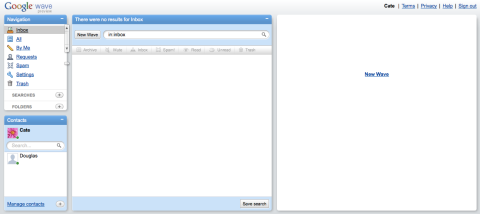
    Google Wave: Empty

    Abstractly I think I thought that Wave would just replace my email. But I can’t send messages to people who aren’t on Wave, and the only contact I have is Dig. I also think Dig is getting bored of the incessant messaging (he, obviously, has a real job). Perhaps the most useful thing I can use it for at the moment is keeping track of the conversations in my head. I.e. I can have a Wave for a project, and write my little notes in it. However when my friends are on it, it’ll be amazing. At the moment we organize events through my Facebook status, but Wave is going to be a so much better solution. Ditto for WISE, sending out mass emails to 10+ people is a nightmare. People need to know what’s going on, but it clogs up your inbox. In a wave, you’ll just be able to skim the stuff that you need to be aware of and it’ll all be part of one conversation.

    Having conversations online is not always that “usable” of an experience; they can be hard to follow, too many threads or responses can overwhelm your inbox or ability to keep up with them. I really think that from what I’ve seen so far Wave will improve that. It’s like – email (longer messages) meets IM (instantaneous, see when they’re typing) meets Facebook (converse with multiple people, passively watch threads) meets real life (yes/no/maybe and map gadgets allow you to gauge interest, plan routes etc – more gadgets are coming. Also not only can you see that someone is typing – you can see what they’re typing as they’re typing it) and something more. The conversations we have online, and how we have them are different from the way we communicate in real life. I think Wave might bring is back to a more “natural” way of conversing.

    One last really cool thing, you can “play back” your conversation, see the button next to reply? If you had a long, confusing conversation I can see that being really useful.

    More screenshots below:

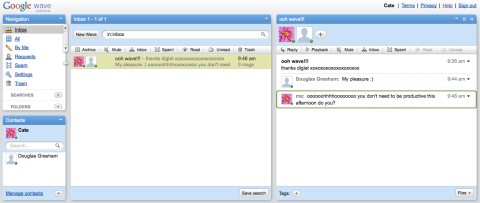
    Google Wave: My First Wave

    Google Wave: Building a Conversation

    Google Wave: Continuing the Conversation

    Google Wave: Multiple Waves

    By the way – I can’t invite people (yet). Wish I could! Sorry to the people who’ve already asked for invitations and those who want to after reading this!

  • I <3 Google Docs

    Check out the video from Google, below.

    I thought it was really cute. Google docs is a great, free alternative to MS Office, but that’s not where the real power of it lies. For collaboration, for any document that anyone else is going to use, it’s such a better alternative.

    During the summer, I was working for a company that was sending spreadsheets about. Seriously. One of my colleagues and I said “this is ridiculous!”, because it was, and put what we needed into a Google doc. Our job was made exponentially easier and it took less than half an hour.

    I’m President of uOttawa WISE (Women in Science and Engineering), and we’re working hard to get things set up for the start of term. There are a myriad of organizational documents, but I think I’ve only emailed one – which was heavy on formatting. I have one spreadsheet on my computer – because it’s confidential. Anyone involved can see what we’re doing, and any new volunteer can be directed to our Google group where she has access to everything she needs to get up to speed. I had to train two volunteers in how to use docs, but given the time and effort it saves us this was an hour well spent.

    Google docs has some little differences from MS Office, and some things are a little trickier – you can’t right-click to insert multiple rows in a spreadsheet, for example. But some aspects of it are actually better.

    The video below is amazing. And those cool moving graphs? You can make them in Google docs, using the Google Gadget Motion Chart. There’s a quick guide how to here.