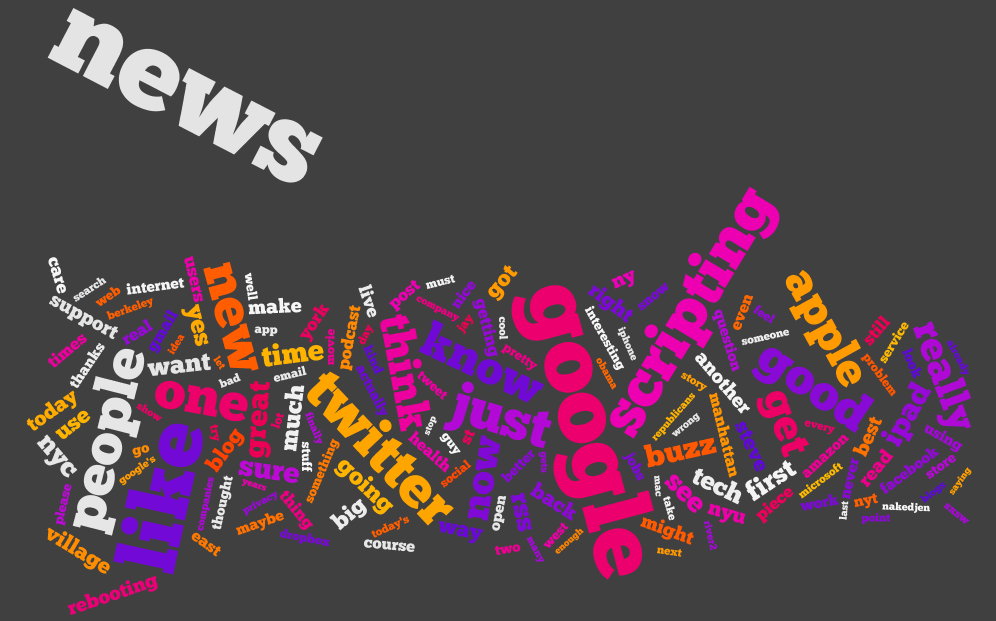
Continued on from Part 4, exploring what they are saying using Word Trees on Many Eyes.
Each image is a link to the applet where you can explore the text and interact with it. Change the word in the top left corner to change the root of the tree.
In which we answer the question – what are they saying?
I’ve split the tweets up into two types – at replies, and not at replies, and a third which contains all tweets. I’ve created wordles of each one, for each of the 20 people we were following.
If you haven’t – check out wordle.net. It’s awesome.
There’s debate as to whether wordles are good ways to analyze text – definitely there are better ways (possibly to be explored in a future post) however I think they’re cool and here they have some utility. Note, though, that sizes of word are relative to the number of words in the data set for that individual, which are of varying size (see Part 1, Part 2, Part 3).
I don’t want to tread on Caitlin’s analysis (I’m just the data junkie), but some things you can see, aside from topics of discussion:
People who make a point of thanking others (most likely for retweets or similar)
People who retweet things that others have said about them
Where RT is conspicuous by it’s absence
Specific websites that get tweeted a lot
My personal favorite is Dave Winer’s all tweets! Let me know what you think.
Alex Howard all Tweets
Alex Howard at Replies
Alex Howard not Directed
Alfred Hermida all Tweets
Alfred Hermida at Replies
Alfred Hermida not Directed
Andrew Keen all Tweets
Andrew Keen at Replies
Andrew Keen not Directed
Cody Brown all Tweets
Cody Brown at Replies
Cody Brown not Directed
Dan Gillmor all Tweets
Dan Gillmor at Replies
Dan Gillmor not Directed
Dave Winer all Tweets
Dave Winer at Replies
Dave Winer not Directed
David Cohn all Tweets
David Cohn at Replies
David Cohn not Directed
David Eaves all Tweets
David Eaves at Replies
David Eaves not Directed
Dr. Mark Drapeau all Tweets
Dr. Mark Drapeau at Replies
Dr. Mark Drapeau not Directed
Howard Weaver all Tweets
Howard Weaver at Replies
Howard Weaver not Directed
Jay Rosen all Tweets
Jay Rosen at Replies
Jay Rosen not Directed
JD Lasica all Tweets
JD Lasica at Replies
JD Lasica not Directed
Jeff Jarvis all Tweets
Jeff Jarvis at Replies
Jeff Jarvis not Directed
Jennifer Preston all Tweets
Jennifer Preston at Replies
Jennifer Preston not Directed
Kirk LaPointe all Tweets
Kirk LaPointe at Replies
Kirk LaPointe not Directed
Mark Glaser all Tweets
Mark Glaser at Replies
Mark Glaser not Directed
Mathew Ingram all Tweets
Mathew Ingram at Replies
Mathew Ingram not Directed
Steve Buttry all Tweets
Steve Buttry at Replies
Steve Buttry not Directed
Steve Outing all Tweets
Steve Outing at Replies
Steve Outing not Directed
Steve Yelvington all Tweets
Steve Yelvington at Replies
Steve Yelvington not Directed
Programming-wise, the code is trivial because wordle accepts free text. But, before I realized that the guy who wrote wordle was much smarter than me, I tried to be clever an optimize it by using a LinkedHashSet. I chose this data structure on the basis that – I wanted O(1) random access (the hash) because I would find the same words repeated, only one instance of each word (the set) and a nice quick iteration (the linked) so I could output a key, value table at the end. And then I discovered that there was no get() or elementAt() method – and stopped trying to be a smart-alec!
Continued on from Part 2, I’m representing similar data in a different (less exciting) way.
Before, we looked at how the activity on the twitter streams was spread out over the day and by different types of interaction. Here, I’m using charts to show the breakdown for the day, by user. I’ve also created charts for each type – these are too busy to show much more than users who are way above average in a particular tweet type.
Like last time, something is either:
Directed
Not directed, but containing a mention
Contains a link, not an @ mention
None of the above.
I’m using the existing code I’ve built up – Apache POI to import and some custom data-structures.
Alex Howard
Alfred Hermida
Andrew Keen
Cody Brown
Dan Gillmor
Dave Winer
David Cohn
David Eaves
Directed Tweets: Starting With an @
Dr. Mark Drapeau
Howard Weaver
Jay Rosen
JD Lasica
Jeff Jarvis
Jennifer Preston
Kirk LaPointe
Mark Glaser
Matthew Ingram
Tweets That Do Not Contain an @ Mention Or A Link
Steve Buttry
Steve Outing
Steve Yelvington
Tweets That Contain A Link But No @ Mention
Tweets That Are Not Directed But Contain An @ Mention
Unfortunately, Excel will only plot 250 data points – how unreasonable! Luckily I love breaking Excel and coding something that will do what I want it to do and look prettier, so voila.
Color scheme:
Is directed at someone by starting with an @
Contains a mention (@) of someone else
Contains a link
Otherwise, the point for that tweet is light gray. Note this is done in the order above, so if 1 is true, then it doesn’t matter if both 2 and 3 are true or false – the tweet will be pink. If 2 is true, the tweet may or may not contain a link – it will still be purple.
Alex Howard
Alfred Hermida
Andrew Keen
Cody Brown
Dan Gillmor
Dave Winer
David Cohn
David Eaves
Dr Mark Drapeau
Howard Weaver
Jay Rosen
JD Lasica
Jeff Jarvis
Jennifer Preston
Kirk LaPoint
Mark Glaser
Matthew Ingram
Steve Buttry
Steve Outing
Steve Yelvington
I used the Processing core.jar library within Eclipse, along with the data-structures I created originally and the Apache POI code for extracting the data from Excel.
I’m enclosing the code below, with some comments:
This code will not compile even with the Processing core.jar library (requires data-structure code that I have not yet released).
There is a horrible hack for calculating the time passed since original date – if you’re doing anything more with time consider Joda Time instead.
The code is written to visualize this data and only this data. Whilst I may create a proper ScatterPlot class for Processing at some point, I’ll probably wait until Java 7 because without lambda functions it will require either a standard data format, or some kind of interface hack to create an adapter pattern. I don’t like either of these approaches.
Aside from this, if you have some other use for it feel free to ping me with questions!
package com.catehuston.caitlin.viz;

import java.io.IOException;
import java.util.Calendar;
import java.util.Date;

import com.catehuston.caitlin.datastructures.Tweet;
import com.catehuston.caitlin.datastructures.User;
import com.catehuston.caitlin.parse.UserList;

import processing.core.PApplet;

@SuppressWarnings("serial")
public class Scatterplot extends PApplet {

	private static final int w = 1260; // 1160 for graph
	private static final int h = 600; // 480 for graph

	// spacing at either side
	private static final int xmargin = 70;
	private static final int ymargin = 60;

	// axis length
	private static final int xlen = w-(xmargin*2);
	private static final int ylen = h-(ymargin*2);

	// increments for day, hour, minute
	private static final int di = xlen/58;
	private static final int hi = ylen/24;
	private static final double mi = hi/60d;

	// user we're graphing
	private int index = 5;
	private User user;

	// calendar for date comparison
	Calendar startDate;

	public void setup() {
		UserList ul;
		try {
			// generate user list from spreadsheet
			ul = new UserList("../data/data_june16_top20.xls");
		} catch (IOException e) {
			// TODO Auto-generated catch block
			e.printStackTrace();
			return;
		}

		// get data just for the user we're interested in
		user = ul.get(index);

		// set applet size
		size(w, h);

		// draw() method will be called only once
		noLoop();

		// set up calendar with base date
		startDate = Calendar.getInstance();
		startDate.set(Calendar.YEAR, 2010);
		startDate.set(Calendar.MONTH, Calendar.FEBRUARY);
		startDate.set(Calendar.DAY_OF_MONTH, 1);
		startDate.set(Calendar.HOUR_OF_DAY, 0);
		startDate.set(Calendar.MINUTE, 0);
	}

	public void draw() {
		// set background color - dark grey
		background(64);

		// set foreground color for text and axes - light grey
		stroke(238);
		fill(238);

		// draw user name string top left
		text(user.getUser(), 5, 15);

		// draw x-axis
		int ypos = ylen+ymargin;
		line(xmargin, ypos, xmargin + xlen, ypos);
		// add major markers

		// initial
		line(xmargin, ypos, xmargin, ypos+5);
		text("Feb 1, 2010", xmargin, ypos+20);

		// mid-feb
		int inc = 13*di;
		line(xmargin + inc, ypos, xmargin + inc, ypos+5);
		text("Feb 14, 2010", xmargin + inc, ypos+20);

		// start of march
		inc = 28*di;
		line(xmargin + inc, ypos, xmargin + inc, ypos+5);
		text("Mar 1, 2010", xmargin + inc, ypos+20);

		// mid march
		inc = inc + 14*di;
		line(xmargin + inc, ypos, xmargin + inc, ypos+5);
		text("Mar 15, 2010", xmargin + inc, ypos+20);

		// end of march
		inc = 58*di;
		line(xmargin + inc, ypos, xmargin + inc, ypos+5);
		text("Mar 31, 2010", xmargin + inc - 60, ypos+20);

		// draw y-axis
		line(xmargin, ymargin, xmargin, ypos);
		// add markers
		for (int i = 0; i < 2401; i+=200) {
			inc = i/100*hi;
			ypos = ymargin + ylen - inc;
			line(xmargin-5, ypos, xmargin, ypos);
			String hrs = i + "h";
			if (i == 0) {
				hrs = "0000h";
			}
			else if (i < 1000) {
				hrs = "0" + hrs;
			}
			text(hrs, xmargin-50, ypos+10);
		}

		// go through and plot points, color according to type
		for (Tweet t : user.getTweets()) {
			// set color according to tweet type
			// @ message
			if (t.isDirected()) {
				// pink
				stroke(236, 0, 128);
				fill(236, 0, 128);
			}
			// someone else is mentioned
			else if (t.isMention()) {
				// purple
				stroke(140, 9, 214);
				fill(140, 9, 214);
			}
			// contains link
			else if (t.hasLink()){
				// yellow
				stroke(255, 126, 0);
				fill(255, 126, 0);
			}
			// otherwise
			else {
				stroke(238);
				fill(238);
			}

			Date d = t.getDate();
			int x = getXPos(d);
			int y = getYPos(d);
			ellipse(x, y, 3, 3);
		}
	}

	private int getXPos(Date date) {
		// make calendar with specified date
		Calendar newDate = Calendar.getInstance();
		newDate.setTime(date);

		// count how many days we go back to find start date
		int count = -1;
		while(startDate.before(newDate)) {
			count++;
			newDate.add(Calendar.DATE, -1);
		}

		return xmargin + count * di;
	}

	private int getYPos(Date date) {
		// put date in calendar so we can manipulate it
		Calendar time = Calendar.getInstance();
		time.setTime(date);

		// work out hour increment
		int hrs = time.get(Calendar.HOUR_OF_DAY) * hi;
		// wor out minute increment
		double mins = time.get(Calendar.MINUTE) * mi;

		// return y value
		return (int) (ylen + ymargin - hrs - mins);
	}
}
I’ve been a little quieter than usual for a number of reasons, one of which is that I’ve been working on a workshop for the University. It’s aimed at getting 17-18 year olds interested in taking Computer Science, and I’m using Processing for that.
I’m experimenting with what I’m calling an Activity Based Curriculum. I.e. rather than deciding to teach a concept like types, or conditional logic, or loops, I work with an example of something that you might actually want to do, and the concept is a side-effect. As I’m using Processing, it’s completely visual. The workshop is just 3 hours long, so I’m aiming to send the students away with an understanding of why it’s cool to be able to program, rather than with the basics of doing so.
As part of my contract, I specified that the course content be licensed under Creative Commons and the code will be released under GPL.
If you’re interested, you can find it here. As ever – let me know what you think.
Because that list of projects in our head that we’ll “do some day, when we have time” is never going to happen until we make time. So we’re getting together and setting aside time for the stuff that is would-like-to rather than must do.
Where?
It’s currently scheduled to be at my place, but if enough people are interested we can probably arrange a space at the university.
OK, I’m in – what do I need?
An idea. Some familiarity with Processing (or Java). Enthusiasm!
I can’t make it then, will there be another one?
I hope so! But that depends on interest and this one being a success. So let me know if you want to but can’t make it!
Find the slides for this below. If you’re interested, there will be a session tonight in Wave at 7pm, but there will be another one later this week as well.