When I left Ottawa, I had to find the new me to run my Processing Workshop. His name is Ali and he’s awesome. He’s had the idea to write up the ideas into a paper, so we’re working on that at the moment, but it occurred to me that I didn’t write much about it here.
I will definitely post more as this project progresses, but for now I’m going to write up some of the design decisions that I think make this different. Comments welcome – it’ll help us write a better paper – or decide it’s not worth the effort!

Entirely Visual
This started when I was teaching programming in the US. Kids taking the other courses were taking home video games, even 3D ones, and so my little programmers weren’t overly excited by the idea of taking home a text-based hangman – and, well, who can blame them?
So we came to an agreement – we designed something together and I coded the GUI and each of them coded their own back-end. I developed more such frameworks the following summer and eventually got asked to develop the curriculum for all of the US.
There, I introduced early concepts using Processing (a language and editor for teaching and artists – makes it really easy to create visual applets) as a library within Eclipse. Some students would code their final projects in Processing, but they had the option of a (Swing) framework. I negotiated my contract such that whilst they owned what I wrote, I licensed them the code I wrote (and retained the IP).
The latest curriculum is designed for one day workshops. Eclipse is an extremely complex and powerful program and has a steep learning curve. The Processing editor is very simple and easy to use and removes some of the syntax necessary to create an applet, so we use that instead.
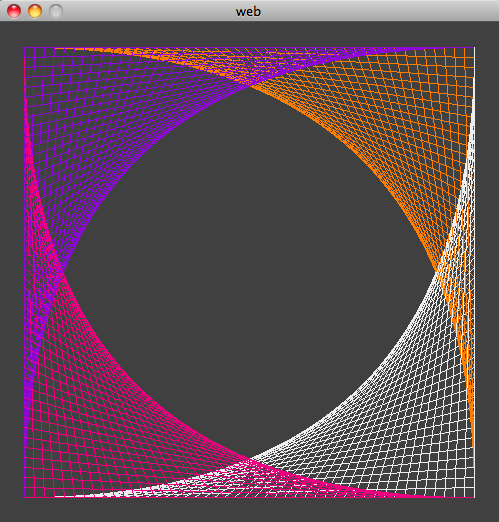
Every exercise has a visual outcome. Students can compare what they have produced to the one in the instructions. This provides visual honesty that is lacking in text-based programming applications. By working visually, we turn the program from a “black-box” where the student often does not understand the relationship between the input and output… into a colourful one.
Activity-Based
I remember learning to program, and I noticed this pattern:
- Introduce concept
- Provide contrived example.
I’ve taught like this too. But – why? That’s not how I code. That looks more like:
- Evaluate problem.
- Apply solution, that I know/look up/invent (for more complex problem).
Contrived examples are 1) boring, and 2) patronizing. Instead, we present things that the student might want to do, for example – repeat things, or sometimes do one thing, sometimes do another, and provide code with an explanation.
For a one-day workshop, we cannot expect the students to memorize concepts and it seems unreasonable to expect them to be interested in doing so. Our focus is on showing them how we can solve problems using code and why that is fun.
Open Source
Everything about our workshop is Open Sourced. The content is licensed under a Creative Commons Attribution-NonCommercial license. Similarly, the Processing library is licensed under the LGPL. So students and teachers can distribute their code without concern, but more importantly – students and their teachers can download the software at home or at school free of charge, and continue to explore the modules in their own time.
TAs
A low ratio of students to TAs (4 students to each TA) was a key part of the strategy for the workshop. Being stuck, and having to wait, is extremely frustrating to a student. Also, more one-on-one help from a TA makes it possible for students to tackle more challenging projects.
I was extremely picky about TAs and interviewed them with technical questions, not just experience questions. I was looking for fast problem solving, and good clear communication of their solution (and in general).
With the short time available for the workshop it was really important that the TAs could fix problems quickly. The key was to keep students moving through the content and feeling like they were progressing – the number one purpose of the workshop was to inspire them to take computer science, rather than to memorize concepts.
Communication was really important – firstly, because a more effective communicator will teach students concepts faster. Secondly, to break the stereotype of CompSci students as socially inept and not fun to hang out with. I was really looking for people who I felt would be good role models for the students. This included not restricting TAing to graduate students, who often code infrequently anyway. For the first workshop, I hired 4 graduate students and two talented undergraduate students as TAs. They were all fantastic. Our second workshop was organized with less notice, but rather than compromise on the quality of TAs we had a slightly higher ratio (5-6 students per TA). Ideally, we will go with the lower ratio but this ratio was workable.
Self-Directed
Related to the low ratio of students to TAs, was the self-directed nature of the workshop. Because the curriculum is available online, there is no need to share printed copies, or wait for the instructor to explain things. Whilst the first couple of modules were necessary to give students familiarity with Processing, students with prior programming experience could quickly skip ahead to more advanced examples. Where possible the modules were written to be stand-alone, so no specific path was necessary. Having a good selection of modules meant that students didn’t have to work on the same “final” thing as their friends, if they didn’t want to.
Inclusive of Interests and Levels
Processing is designed as a tool for artists, and there are several modules involving creating fractals and showing students how to create patterns. Creating games is often used to engage kids and teenagers in wanting to learn to code, but by allowing this alternative, artistic track, we hope to broaden the reach of our workshop. But, if they want, there’s a framework for a simplified game of Pacman. We plan to add more games, such as BrickBreaker, over the next few months (subject to funding).
Some students come with prior programming knowledge, and others do not. We will sometimes run a workshop for multiple schools simultaneously, and we don’t know what background knowledge the students have. This is in addition to the usual issues of different abilities! We have a mix of modules of varying challenges; for example, the most tricky parts of the fractals and patterns is the math, so students less comfortable writing code can work on those. An open-ended attitude means that there is always additional challenges, for example – animation! Students with prior knowledge of programming will often define their own challenge, or even look elsewhere on the internet and explore the 3D capabilities of Processing.
Overall
Honestly, I think computer science tends to be really appallingly taught. I don’t pretend to know how we should do it, but we need to do better. It’s great if people want to use, or critique what I’ve created, but the big thing is – I think it’s important that we have a conversation about how to make CS more engaging, whilst still teaching the skills that students need. They need to be able to code, not just write Java with the help of Eclipse.
You can find the workshop here