Tag: sunflower layout

  • Folders of Images, Compare and Contrast

    Folders of Images, Compare and Contrast

    Now I’ve experimented with things, I wanted to make something that would allow me to compare different effects on the same photo, and loop through a folder of pictures looking for nice effects.

    I overrode mousePressed() to change the image on click.

    The big challenge here was running out of Java Heap space once I had more than one image being processed – most of the images are around 2MB each. This meant I couldn’t just read in the image 3 times and manipulate it (or not manipulate it), and even drawing the original first then manipulating it meant I had two manipulated images. I tried a few things here, starting with just increasing the heap size, to no avail. Eventually what I did was resize the image down to the size I was going to display, and creating new images of that size, and then copying the pixels over.

    That resolved the issue, except when looping through the images and taking screenshots – I have no idea why this would affect things. For the most part, it worked fine though.

    It’s nice to compare the effects side-by-side, see the different bits that are highlighted, depending on the effect. Sometimes it just looks like the weather is completely different. I really love the night-time photos, and the effect that makes them black and white… apart from the lights. Including in this post my favourites and those I found most interesting.

    One suggestion I’ve had is to ignore pixels that are at extremes in saturation/brightness (i.e. close to black or white), but having looked at the effects on more images, I’m not convinced that is going to make things better.

     img 1
    img 2

    img 3
    img 4
    img 5
    img 6
    img 7
    img 8
    img 9
    img 10
    img 11
    img 12
    img 13
    img 14
    img 15
    img 16
    img 17
    img 18
    img 19
    img 20
    img 21
    img 22
    img 23
    img 24
    img 25
    img 26
    img 27
    img 28
    img 29
    img 30
    img 31
    img 32
    img 33
    img 34
    img 35
    img 36
    img 37
    img 38
    img 39
    img 40

    Source Code

    ColorHelper.java

    package color;
    
    import processing.core.PApplet;
    import processing.core.PImage;
    import model.HSBColor;
    
    public class ColorHelper {
    
    	public static HSBColor hsbColorFromImage(PImage img, PApplet applet, int hueRange) {
    		img.loadPixels();
    		int numberOfPixels = img.pixels.length;
    		int[] hues = new int[hueRange];
    		float[] saturations = new float[hueRange];
    		float[] brightnesses = new float[hueRange];
    
    		for (int i = 0; i < numberOfPixels; i++) {
    			int pixel = img.pixels[i];
    			int hue = Math.round(applet.hue(pixel));
    			float saturation = applet.saturation(pixel);
    			float brightness = applet.brightness(pixel);
    			hues[hue]++;
    			saturations[hue] += saturation;
    			brightnesses[hue] += brightness;
    		}
    
    		// Find the most common hue.
    		int hueCount = hues[0];
    		int hue = 0;
    		for (int i = 1; i < hues.length; i++) {
     			if (hues[i] > hueCount) {
    				hueCount = hues[i];
    				hue = i;
    			}
    		}
    
    		// Return the color to display.
    		float s = saturations[hue] / hueCount;
    		float b = brightnesses[hue] / hueCount;
    		return new HSBColor(hue, s, b);
    	}
    }

    CompareAndContrastHue.java

    package ui;
    
    import java.io.File;
    
    import color.ColorHelper;
    import model.HSBColor;
    import processing.core.PApplet;
    import processing.core.PImage;
    
    @SuppressWarnings("serial")
    public class CompareAndContrastHue extends PApplet {
    
    	int fileIndex = 0;
    	private String[] fileNames;
    	private static String filePath = "../data/images/";
    
    	static final int hueRange = 320;
    	static final int hueTolerance = 40;
    	private static final int imageWidth = 384;
    	private static final int imageHeight = 268;
    
    	public void setup() {
    		size(3*imageWidth, imageHeight);
    		background(0);
    		noLoop();
    		colorMode(HSB, hueRange - 1);
    		// Read in images.
    		File dir = new File(filePath);
    		fileNames = dir.list();
    		nextFileIndex();
    	}
    
    	public void draw() {
    		PImage img = loadImage(filePath + fileNames[fileIndex]);
    		img.loadPixels();
    		img.resize(imageWidth, imageHeight);
    		HSBColor color = ColorHelper.hsbColorFromImage(img, this, hueRange);
    		image(img, imageWidth, 0, imageWidth, imageHeight);
    
    		// Display image only showing dominant hue.
    		drawImage(createImage(imageWidth, imageHeight, HSB), img.pixels, color,
    				0, 0, imageWidth, imageHeight, false);
    
    		// Display image excluding dominant hue.
    		drawImage(createImage(imageWidth, imageHeight, HSB), img.pixels, color,
    				2 * imageWidth, 0, imageWidth, imageHeight, true);
    	}
    
    	public void mousePressed() {
    		nextFileIndex();
    		redraw();
    	}
    
    	private void drawImage(PImage img, int[] pixels, HSBColor color,
    			int x, int y, int width, int height, boolean showDominantHue) {
    		img.loadPixels();
    		// Manipulate photo, grayscale any pixel that isn't close to that hue.
    		for (int i = 0; i < img.pixels.length; i++) {
    			int pixel = pixels[i];
    			float hue = hue(pixel);
    			if (hueInRange(hue, color.h, hueTolerance) == showDominantHue) {
    				float brightness = brightness(pixel);
    				img.pixels[i] = color(brightness);
    			} else {
    				img.pixels[i] = pixel;
    			}
    		}
    		image(img, x, y, width, height);
    	}
    
    	private void nextFileIndex() {
    		while (true) {
    			fileIndex++;
    			if (fileIndex < fileNames.length) {
    				if (fileNames[fileIndex].toLowerCase().contains(".jpg")) {
    					break;
    				}
    			} else {
    				fileIndex = 0;
    			}
    		}
    	}
    
    	private static boolean hueInRange(float hueA, float hueB, int tolerance) {
    		return Math.abs(hueA - hueB) < tolerance;
    	}
    }
  • Visualising A Photo Series

    Visualising A Photo Series

    Whenever I’m scrolling through pictures I’ve taken, it seem like they are in sections – here’s when I was near the beach, he’s the park, the night sky and fireworks. I thought if you visualised the way that the dominant colors changed, patterns would emerge.

    I found the perfect layout for this, the sunflower layout, and then did nothing about it for… a long time. I claim the craziness of work and life. Also, I knew nothing about color, and had no idea how I would go about extracting the dominant color from an image.

    But I did some research and figured it out, the trick was working with hues rather than RGB values.

    And voila, here is another way to see the story of my trip to North Korea.

    Sunflower Visualization from Photos Taken in North Korea
    Sunflower Visualization from Photos Taken in North Korea

    Maybe the main thing I can see from this experiment is that I don’t take as colorful photos as I like to imagine I do. Also, that I took a lot of photos in North Korea (the major bottleneck to my blog posts about it).

    So I put together another collection of images – almost everything I’ve taken since mid-June aside from in North Korea, including the shipwreck, my trips to Tasmania, Queenstown (skiing!), Hong Kong, Tokyo and photos I’d taken around Sydney and visualised that with the result below.

    Sunflower visualization from photos taken between mid-June and late-August (aside from NK)
    Sunflower visualization from photos taken between mid-June and late-August (aside from NK)

    This is where I discovered that it doesn’t work well with panoramas (I had recently discovered the panorama feature on my iPhone and had taken a few, typically at 5-7MB in size) which threw an exception, because it was out of Java heap space. I’d need to make the code more efficient to process panoramas – for now, I just left them out.

    I’d like to add more to it, maybe clicking on an element in the layout could bring up the photo, with only the dominant color (with some tolerance) exposed. Maybe animate it with the image that’s being processed displayed alongside. I’d love to pull in my most recent pictures on Twitter and display them this way. I think, how many images are needed to create something cool looking may make that prohibitive, though. For now, I’m happy that I’ve got something working.

    Processing one image like this doesn’t take a noticeable amount of time, however this first (NK) one is made from 1048 images, and 2.26GB of data. On my 13″ Macbook pro… it takes a while.

    Note – I made an HSBColor class that just holds hue, saturation, and brightness.


    Source Code


    import java.io.File;
    
    import processing.core.PApplet;
    import processing.core.PImage;
    
    @SuppressWarnings("serial")
    public class SunflowerImages extends PApplet {
    
    	private static String filePath = "../data/nkimages/";
    	private String[] fileNames;
    
    	static final int hueRange = 320;
    	private static final int radius = 9;
    	private static final int scale = 7;
    
    	private static final double goldenangle = Math.PI * (3 - Math.sqrt(5));
    
    	private static final int wh = 500;
    
    	public void setup() {
    		size(wh, wh);
    		background(0);
    		noLoop();
    		colorMode(HSB, hueRange - 1);
    		// Read in images.
    		File dir = new File(filePath);
    		fileNames = dir.list();
    	}
    
    	public void draw() {
    		int n = 0;
    		double a = 0;
    
    		for (String file : fileNames) {
    			PImage img = loadImage(filePath + file);
    			if (img == null) {
    				continue;
    			}
    			print("processing image: " + file + "\n");
    
    			double h = Math.sqrt(n)*scale;
    			double x = wh/2 + Math.sin(a) * h;
    			double y = wh/2 + Math.cos(a) * h;
    
    			stroke(100);
    			HSBColor color = extractColorFromImage(img);
    			fill(color.h, color.s, color.b);
    			ellipse((float) x, (float) y, radius, radius);
    
    			a+=goldenangle;
    			n++;
    		}
    	}
    
    		private HSBColor extractColorFromImage(PImage img) {
    			img.loadPixels();
    			int numberOfPixels = img.pixels.length;
    			int[] hues = new int[hueRange];
    			float[] saturations = new float[hueRange];
    			float[] brightnesses = new float[hueRange];
    
    			for (int i = 0; i < numberOfPixels; i++) {
    				int pixel = img.pixels[i];
    				int hue = Math.round(hue(pixel));
    				float saturation = saturation(pixel);
    				float brightness = brightness(pixel);
    				hues[hue]++;
    				saturations[hue] += saturation;
    				brightnesses[hue] += brightness;
    			}
    
    			// Find the most common hue.
    			int hueCount = hues[0];
    			int hue = 0;
    			for (int i = 1; i < hues.length; i++) {
     				if (hues[i] > hueCount) {
    					hueCount = hues[i];
    					hue = i;
    				}
    			}
    
    			// Return the color to display.
    			float s = saturations[hue] / hueCount;
    			float b = brightnesses[hue] / hueCount;
    			return new HSBColor(hue, s, b);
    		}
    }
  • Sunflower Layout in Processing

    Sunflower Layout in Processing

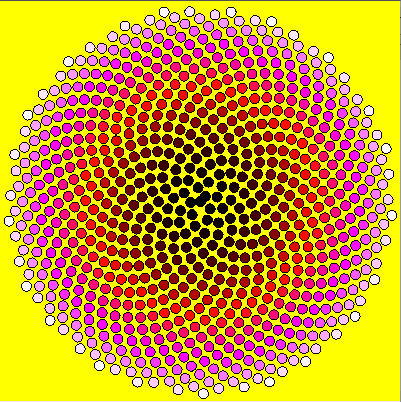
    For a while, I’ve been wanting to make something that explores color in photo sets. Reading Beautiful Visualization (Amazon), I came across the perfect way to arrange the elements. It imitates the layout of the sunflower seeds, “the most efficient and visually mesmerizing way of packing small elements into a large circle”.

    I decided to try the layout in Processing and to keep it simple, by following an easy rule for creating color. Start with black (the absence of color) and add red, then when red was saturated add blue, and finally green until we reach white. Because there is no yellow in the pattern, I used yellow for the background.

    I’m not entirely happy with the very centre (I think this is a consequence of having to convert between double and float) but it’s pretty cool:

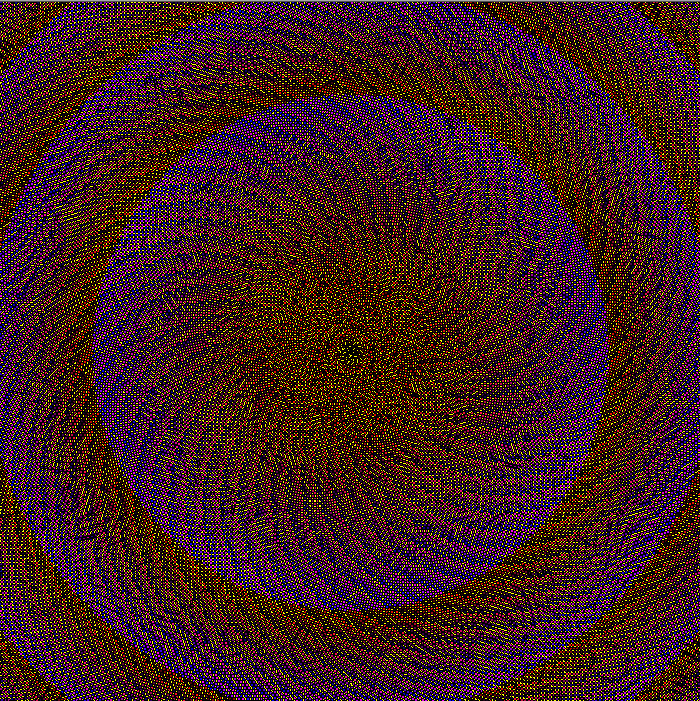
    Using a different strategy for changing color (essentially generating every even numbered RGB value) with smaller radius and spacing, I made the image below.

    I love this layout!

    I use Java in Eclipse with the core.jar library. You can use this code in the Processing Editor with some small modifications.

    Code

    import processing.core.PApplet;
    
    
    public class SunflowerSeeds extends PApplet {
    	
    	private static final int radius = 10;
    	private static final int scale = 7;
    	
    	private static final double goldenangle = Math.PI * (3 - Math.sqrt(5));
    	
    	private static final int wh = 400;
    	
    	public void setup() {
    		size(wh, wh);
    		background(255, 255, 0);
    		noLoop();
    	}
    
    	public void draw() {
    		int r = 0;
    		int g = 0;
    		int b = 0;
    		
    		int n = 0;
    		
    		double a = 0;
    	
    		while (g < 255) {
    			if (r < 255) {
    				r++;
    			}
    			else if (b < 255) {
    				b++;
    			}
    			else {
    				g++;
    			}
    			
    			double h = Math.sqrt(n)*scale;
    			double x = wh/2 + Math.sin(a) * h;
    			double y = wh/2 + Math.cos(a) * h;
    			
    			stroke(0);
    			fill(r, g, b);
    			ellipse((float) x, (float) y, radius, radius);
    			
    			a+=goldenangle;
    			n++;
    		}
    	}
    }
    

    Code for Animated Version

    import processing.core.PApplet;
    
    public class SunflowerAnimated extends PApplet{
    
    	private static final int radius = 10;
    	private static final int scale = 7;
    
    	private static final double goldenangle = Math.PI * (3 - Math.sqrt(5));
    
    	private static final int wh = 400;
    
    	private int r = 0;
    	private int g = 0;
    	private int b = 0;
    
    	private int n = 0;
    	private double a = 0;
    
    	public void setup() {
    		size(wh, wh);
    		background(255, 255, 0);
    	}
    
    	public void draw() {
    		if (g >= 255) {
    			noLoop();
    			return;
    		}
    		else if (r < 255) {
    			r++;
    		}
    		else if (b < 255) {
    			b++;
    		}
    		else {
    			g++;
    		}
    
    		double h = Math.sqrt(n)*scale;
    		double x = wh/2 + Math.sin(a) * h;
    		double y = wh/2 + Math.cos(a) * h;
    		a+=goldenangle;
    		stroke(0);
    		fill(r, g, b);
    		ellipse((float) x, (float) y, radius, radius);
    
    		n++;
    	}
    }